
Capture
capture.take captures one image from the currently opened device and applies page processing, color optimization, thumbnails, and an optional image enhancement pipeline according to profile. It is asynchronous: after acceptance, it immediately returns a task_id; use task events or capture.get to obtain the result.
Recommended Flow
device.open
  -> capture.take(profile, optional pipeline)
  -> base capture processing: page processing / color mode / thumbnails
  -> optional image enhancement: apply pipeline.steps to final images
  -> wait for capture.completed / capture.failed or poll capture.get
  -> read assets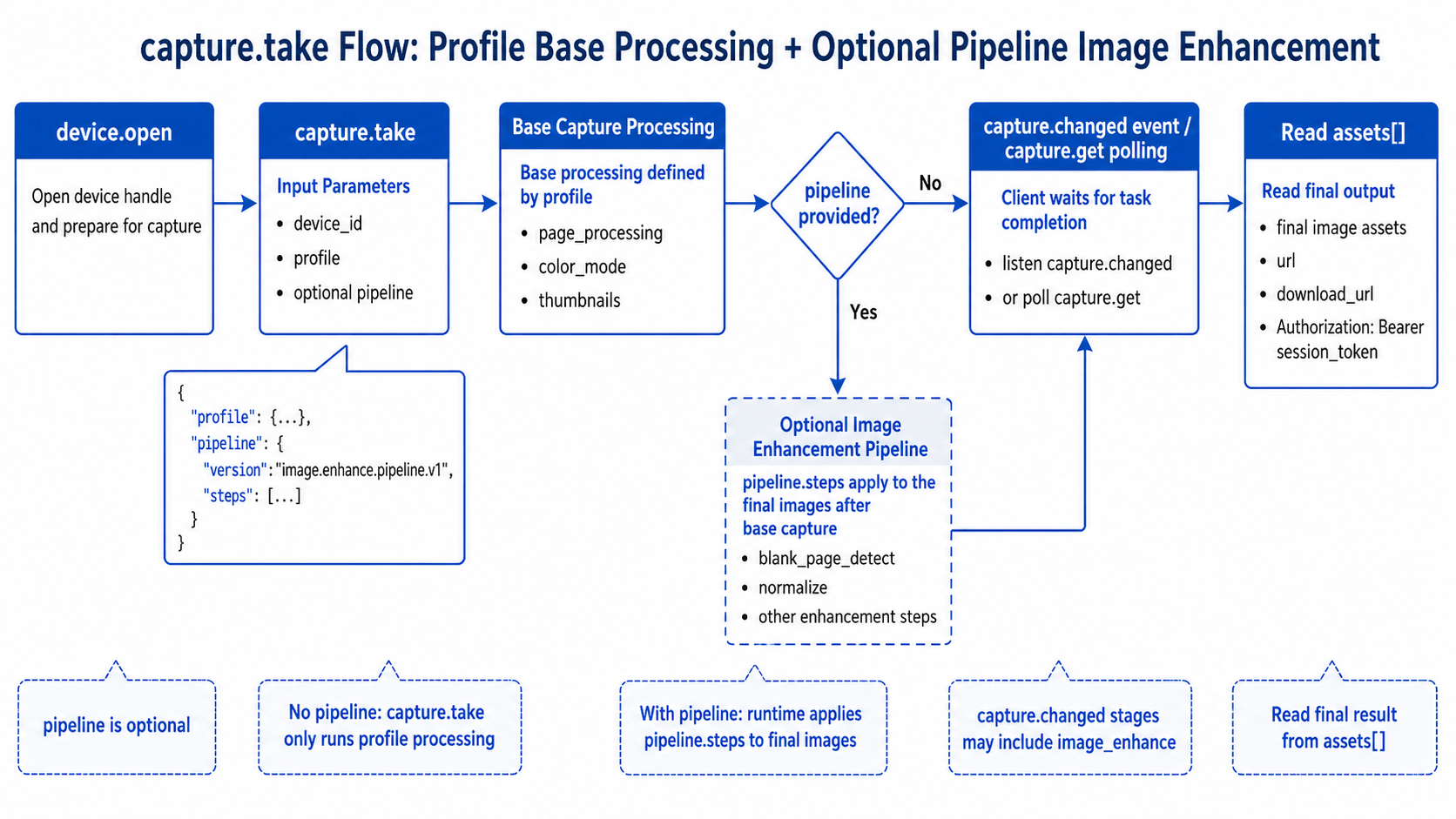
pipeline is optional. If omitted, capture.take only runs the page processing, color optimization, and thumbnail output defined by profile. To create and save reusable pipelines, see Image Processing and Enhancement - Workflow.
Example
{
  "request_id": "req-capture-001",
  "method": "capture.take",
  "params": {
    "device_id": "mock-device-01",
    "include_base64": false,
    "timeout_ms": 15000,
    "profile": {
      "profile_version": "capture.profile.v1",
      "capture": {
        "page_processing": "single_page",
        "color_mode": "auto_optimize",
        "single_page": {
          "auto_rotate": true,
          "smart_black_edge_optimize": true,
          "multi_target_paging": false
        }
      },
      "output": {
        "format": "jpg",
        "thumbnails": {
          "original": true,
          "page_processed": true,
          "final": true
        }
      }
    },
    "pipeline": {
      "version": "image.enhance.pipeline.v1",
      "steps": [
        {
          "id": "blank",
          "type": "blank_page_detect",
          "enabled": true,
          "params": { "action": "drop" }
        },
        {
          "id": "normalize",
          "type": "normalize",
          "enabled": true,
          "params": { "target": "a4" }
        }
      ],
      "target": {
        "type": "images",
        "format": "jpg",
        "export_type": "single-page"
      }
    }
  }
}
Omit the whole pipeline field when image enhancement is not needed.
The accepted response contains accepted=true, task_id, and an initial status=queued. Query the completed task with:
{
  "request_id": "req-capture-get-001",
  "method": "capture.get",
  "params": {
    "task_id": "cap-..."
  }
}
capture.get can only query tasks created by the current Command WS connection. The capture_source, acquisition_status, and processing_status fields in a task detail distinguish the source, original-image acquisition state, and later processing state. See the Capture API for all field values.
Capture Statistics for the Session
After the connection has an authorization session, call capture.session.get to get statistics for the current Command WS connection:
{
  "request_id": "req-capture-session-001",
  "method": "capture.session.get",
  "params": {}
}
data.summary contains:
| Field | Description |
|---|---|
captured_count | Number of tasks whose original image was acquired successfully. |
processed_count | Number of tasks whose complete processing flow succeeded. |
failed_count | Number of tasks that failed during acquisition or processing. |
pending_count | Number of tasks with an acquired original image whose processing is not complete. |
devices[] | Totals using the same definitions, grouped by device_id. |
Each statistics change publishes capture.session.updated on Command WS. Its payload includes device_id, task_id, reason, and the complete summary. Frontends must replace their current statistics with this summary rather than incrementing values from individual events. Like capture.get, the statistics only include tasks created by the current connection.
Capture Interval and Error Handling
Two capture triggers for the same device must be at least 1500 ms apart. Another capture.take call in that interval returns RateLimited (1004), and data.retry_after_ms gives the recommended delay in milliseconds. Delay the retry by that value.
DeviceBusy (1201) is returned while the device is executing a capture action. Existing tasks that are still being processed do not cause this error, so another capture can be submitted once the 1500 ms interval has elapsed. Invalid parameters, rate limits, and device-busy responses do not create a capture task or consume capture.take call quota.
Page-Turn and Hard-Grab Events
If the business flow needs to react to page-turn or hard-grab actions, call capture.set_turn_detect after device.open, then listen for Command WS events:
{
  "request_id": "req-turn-detect-001",
  "method": "capture.set_turn_detect",
  "params": {
    "device_id": "mock-device-01",
    "enabled": true,
    "auto_capture": false,
    "cooldown_ms": 1000
  }
}| Event | When it fires | Client action |
|---|---|---|
capture.turn_detected | The device detects a page-turn action. | Refresh preview, notify the user, or call capture.take according to the business flow. |
capture.hardgrab_detected | The device detects a hard-grab action. | Check accepted and task information, then update the UI. Do not resubmit the same hard-grab. |
The hard-grab event contains device_id, auto_capture, ts_ms, and accepted. An accepted event also contains task, task_id, and status; a rejected event contains code, message, and error, and includes retry_after_ms when rate limited. Hard-grab and manual capture share the 1500 ms interval for the same device.
Reading Assets
capture.get returns assets[]. Each asset contains asset_id, kind, url, and download_url. Asset reads require Authorization: Bearer <session_token>.
const image = await fetch(asset.url, {
  headers: { Authorization: `Bearer ${sessionToken}` }
})
With Image Enhancement
capture.take accepts a pipeline whose structure is compatible with the image.enhance pipeline. The current runtime first completes the base capture processing from profile, then uses the generated final image as the input for pipeline.steps.
The processing order is:
raw captured image
  -> profile.capture.page_processing
  -> profile.capture.color_mode
  -> profile.output.thumbnails
  -> optional pipeline.steps
  -> capture assets
A capture pipeline is useful for post-capture image enhancement, such as blank-page detection, layout normalization, sharpening, or other enhancement steps. When reusing a saved image.enhance_workflow in capture, set target to images / single-page. If the business flow needs PDF, OFD, or TIFF output, run file conversion or a standalone image.enhance flow after capture completes.
Clients listen for capture.started, capture.stage.updated, capture.completed, and capture.failed, or call capture.get. When a pipeline is enabled, task stages may include an image_enhance stage; after completion, read assets[] for the final result.