
拍摄采集
capture.take 使用当前打开设备拍摄一张图片,并按 profile 执行页面处理、色彩优化、缩略图和可选图像增强 pipeline。该方法为异步调用:成功受理后立即返回 task_id,再通过任务事件或 capture.get 获取结果。
推荐流程
device.open
  -> capture.take(profile, optional pipeline)
  -> 基础采集处理:page processing / color mode / thumbnails
  -> 可选图像增强:pipeline.steps 作用于 final 图片
  -> 等待 capture.completed / capture.failed 事件或轮询 capture.get
  -> 读取 assets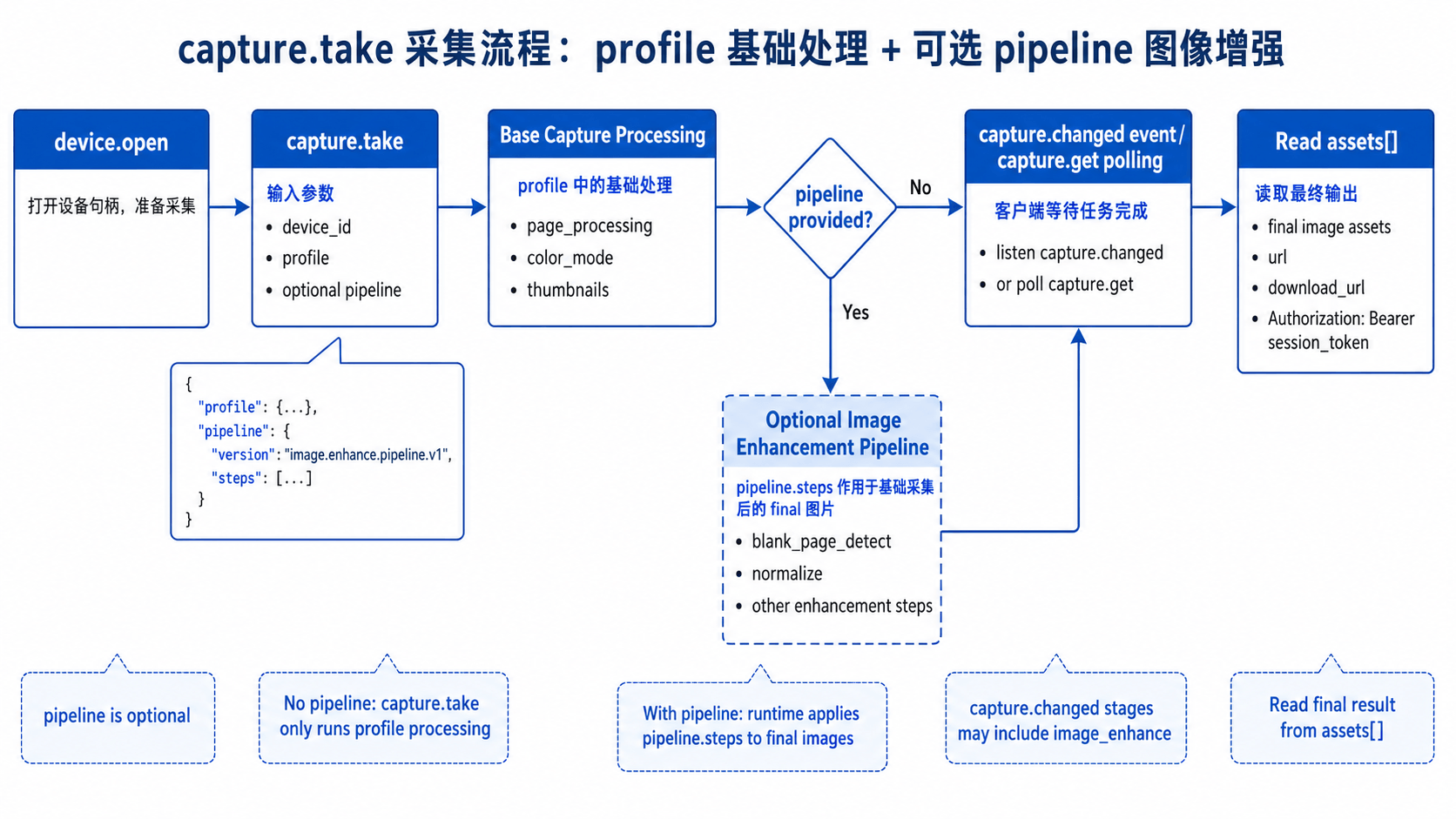
pipeline 是可选参数;不传时,capture.take 只执行 profile 中的页面处理、色彩优化和缩略图输出。pipeline 的创建与保存可参考 图像处理与增强 - Workflow。
示例
{
  "request_id": "req-capture-001",
  "method": "capture.take",
  "params": {
    "device_id": "mock-device-01",
    "include_base64": false,
    "timeout_ms": 15000,
    "profile": {
      "profile_version": "capture.profile.v1",
      "capture": {
        "page_processing": "single_page",
        "color_mode": "auto_optimize",
        "single_page": {
          "auto_rotate": true,
          "smart_black_edge_optimize": true,
          "multi_target_paging": false
        }
      },
      "output": {
        "format": "jpg",
        "thumbnails": {
          "original": true,
          "page_processed": true,
          "final": true
        }
      }
    },
    "pipeline": {
      "version": "image.enhance.pipeline.v1",
      "steps": [
        {
          "id": "blank",
          "type": "blank_page_detect",
          "enabled": true,
          "params": { "action": "drop" }
        },
        {
          "id": "normalize",
          "type": "normalize",
          "enabled": true,
          "params": { "target": "a4" }
        }
      ],
      "target": {
        "type": "images",
        "format": "jpg",
        "export_type": "single-page"
      }
    }
  }
}
如果不需要图像增强,可省略整个 pipeline 字段。
成功受理后的响应包含 accepted=true、task_id 和初始 status=queued。任务完成后使用:
{
  "request_id": "req-capture-get-001",
  "method": "capture.get",
  "params": {
    "task_id": "cap-..."
  }
}
capture.get 只能查询当前 Command WS 连接创建的任务。任务详情中的 capture_source、acquisition_status 和 processing_status 可用于分别展示触发来源、原图采集状态和后续处理状态。字段的完整取值请参考 采集接口。
会话采集统计
连接建立并创建授权会话后,可主动调用 capture.session.get 获取当前 Command WS 连接的统计:
{
  "request_id": "req-capture-session-001",
  "method": "capture.session.get",
  "params": {}
}
响应 data.summary 包含:
| 字段 | 说明 |
|---|---|
captured_count | 原图采集成功的任务数。 |
processed_count | 完整处理成功的任务数。 |
failed_count | 原图采集或处理失败的任务数。 |
pending_count | 已采集原图但尚未完成处理的任务数。 |
devices[] | 以 device_id 区分的同口径统计。 |
统计变化时,Command WS 会推送 capture.session.updated,payload 包含 device_id、task_id、reason 与完整 summary。前端应直接以该 summary 覆盖当前统计;不要按单个事件自行累加。该统计和 capture.get 一样,只包含当前连接创建的任务。
采集间隔与错误处理
同一设备两次采集触发之间至少间隔 1500ms。间隔内再次调用 capture.take 会返回 RateLimited (1004),响应 data.retry_after_ms 给出建议等待的毫秒数;客户端应按该值延后重试。
设备正在执行拍照动作时会返回 DeviceBusy (1201)。处理中的既有任务不会导致该错误,因此达到 1500ms 间隔后可以继续拍照。参数错误、限频或设备忙时不会创建采集任务,也不会消耗 capture.take 的调用额度。
翻页与硬拍事件
如果业务需要响应设备翻页或硬拍动作,可在 device.open 后调用 capture.set_turn_detect 开启检测,并监听 Command WS 事件:
{
  "request_id": "req-turn-detect-001",
  "method": "capture.set_turn_detect",
  "params": {
    "device_id": "mock-device-01",
    "enabled": true,
    "auto_capture": false,
    "cooldown_ms": 1000
  }
}| 事件 | 触发时机 | 客户端建议 |
|---|---|---|
capture.turn_detected | 设备检测到翻页动作。 | 根据业务需要刷新预览、提示用户或主动调用 capture.take。 |
capture.hardgrab_detected | 设备检测到硬拍动作。 | 检查 accepted 和任务信息,更新 UI。不要再次提交同一次硬拍。 |
硬拍事件包含 device_id、auto_capture、ts_ms 和 accepted。受理成功时还包含 task、task_id、status;未受理时包含 code、message、error,因限频未受理时还会提供 retry_after_ms。硬拍与手动拍照共用同一设备的 1500ms 采集间隔。
资产读取
capture.get 返回 assets[],每个资产包含 asset_id、kind、url 和 download_url。读取资产时需要 Authorization: Bearer <session_token>。
const image = await fetch(asset.url, {
  headers: { Authorization: `Bearer ${sessionToken}` }
})
与图像增强联动
capture.take 可传入 pipeline,其结构与 image.enhance 的 pipeline 兼容。当前 runtime 会先按 profile 完成采集基础处理,再把生成的 final 图片作为输入,依次执行 pipeline.steps。
处理顺序可以理解为:
原始拍摄图片
  -> profile.capture.page_processing
  -> profile.capture.color_mode
  -> profile.output.thumbnails
  -> optional pipeline.steps
  -> capture assets
capture.take 中的 pipeline 适合做采集后的图片增强,例如空白页检测、版面归一化、清晰化或其他增强步骤。复用保存的 image.enhance_workflow 时,建议在采集场景把 target 设置为 images / single-page;如果要导出 PDF、OFD 或 TIFF,建议在采集完成后再调用文件转换或独立的 image.enhance 流程。
任务执行过程中,客户端监听 capture.started、capture.stage.updated、capture.completed、capture.failed,或调用 capture.get。当启用 pipeline 时,事件中的 stages 可能出现 image_enhance 阶段;任务完成后读取 assets[] 即可拿到最终结果。